


Dynamic assignments
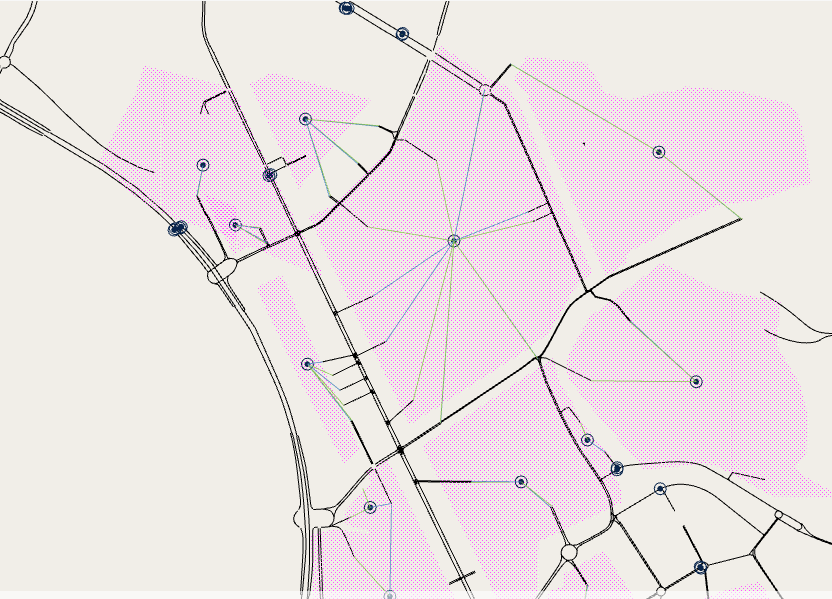
For dynamic experiments (macro-meso, meso-micro, meso and micro) connections have no cost, but there are several parameters that control how each vehicle chooses between multiple entrance and exit connections and how the paths between them are calculated and evaluated
These are defined in the centroid properties:
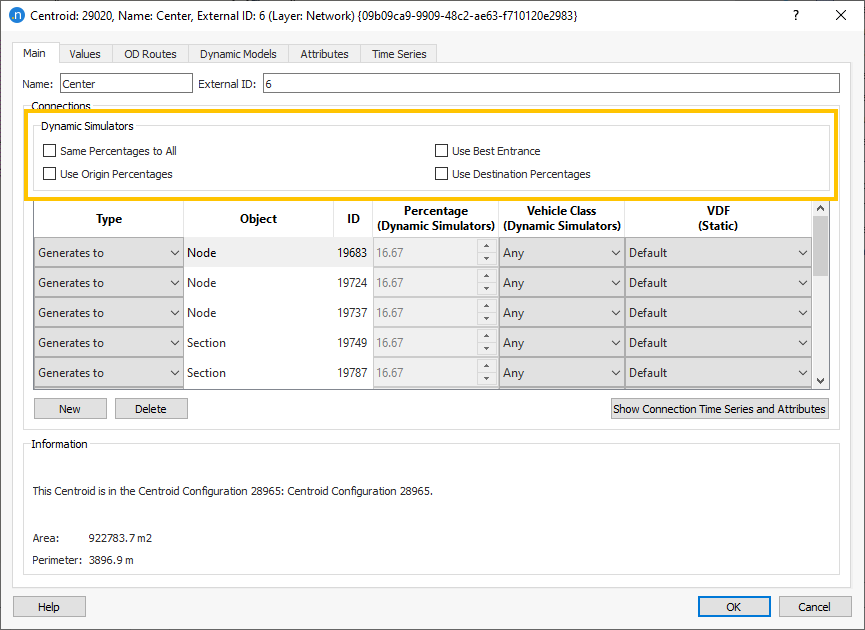
If no box is ticked, then the vehicles choose a connection according to the cost to their destination, as calculated using the initial and dynamic cost functions. In general, this means that vehicles use the entrance(s) that will get them to their destination quickest, and therefore this should be the default and preferred setting.
.tg {border-collapse:collapse;border-color:#ccc;border-spacing:0;}
.tg td{background-color:#fff;border-color:#ccc;border-style:solid;border-width:1px;color:#020101;
font-family:Regular;font-size:14px;overflow:hidden;padding:10px 5px;word-break:normal;}
.tg th{background-color:#f0f0f0;border-color:#ccc;border-style:solid;border-width:1px;color:#333;
font-family:Arial, sans-serif;font-size:14px;font-weight:normal;overflow:hidden;padding:10px 5px;word-break:normal;}
.tg .tg-1wig{font-weight:bold;text-align:left;vertical-align:top}
.tg .tg-0lax{text-align:left;vertical-align:top}
| Model | SRC with default options | SRC with Use Best Entrance | DUE | |||
|---|---|---|---|---|---|---|
| Step | Path list | Description | Path list | Description | Path list | Description |
| 1 | 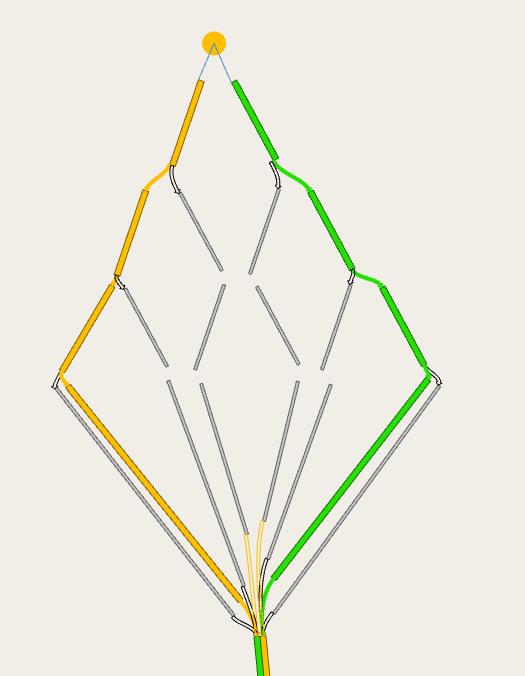 |
In the first interval of the warm or main simulation, calculate using the ICF the least cost path tree. When there are multiple entrance connections, the tree will provide one path per entrance connection for the same OD.
Add all these to the path set. With two entrance connections, it can contain up to two paths. If there are already multiple paths, calculate the probability of choice by applying the discrete choice function. |
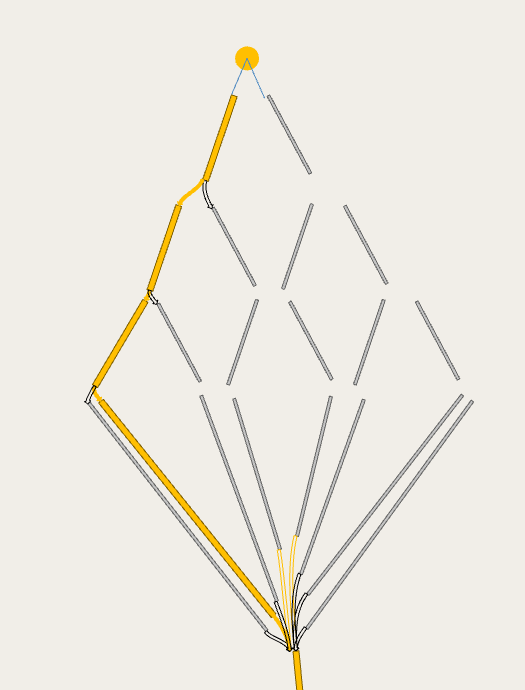 |
In the first interval of the warm or main simulation, calculate using the ICF the least cost path tree.
Add only the least cost path to the set for all intervals. There is one path in the path set. Assign all vehicles to that path. |
|
In the first iteration calculate, using the ICF the least cost path tree.
Add only the least cost path to the set for all intervals. There is one path in the path set. Assign all vehicles to that path. Note that the path is the same for all intervals. |
| 2 | 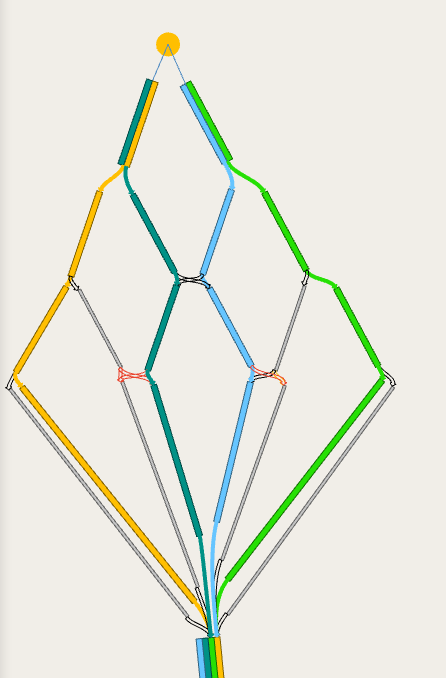 |
In the next cost interval, using the DCF and the costs at the end of the previous interval, calculate the least cost path tree. When there are multiple entrance connections, the tree will provide multiple paths for the same OD.
Add all these to the path set. With two entrance connections, it can contain up to four paths. Select from the path set the 3 paths with lower cost and calculate the probability of choice by applying the discrete choice function. |
|
In the next cost interval, using the DCF and the costs at the end of the previous interval, calculate the least cost path tree.
Add only the least cost path to the set. There are now (up to) two paths in the path set. Calculate the probability of choice by applying the discrete choice function. |
|
In the next iteration, for each interval, calculate, using the DCF and the costs at the end of the same interval in the previous iteration, the least cost path tree.
Add only the least cost path to the set.There are now (up to) two paths in the path set. Split vehicles equally. |
| 3 | 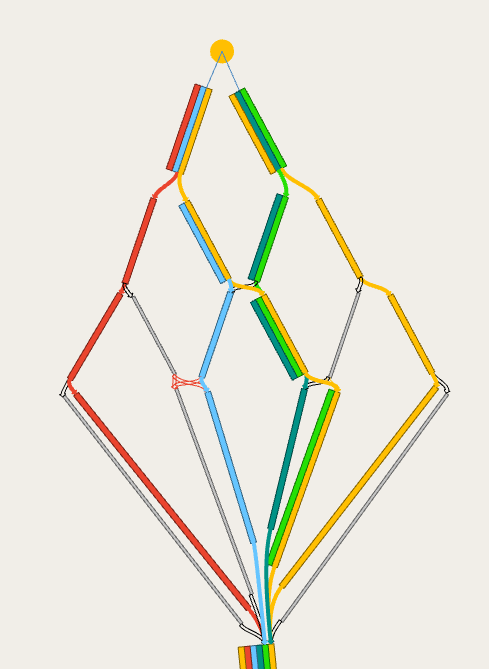 |
In the next cost interval, using the DCF and the costs at the end of the previous interval, calculate the least cost path tree. When there are multiple entrance connections, the tree will provide multiple paths for the same OD.
Add all these to the path set. With two entrance connections, it can contain up to six paths. Select from the path set the 3 paths with lower cost and calculate the probability of choice by applying the discrete choice function. |
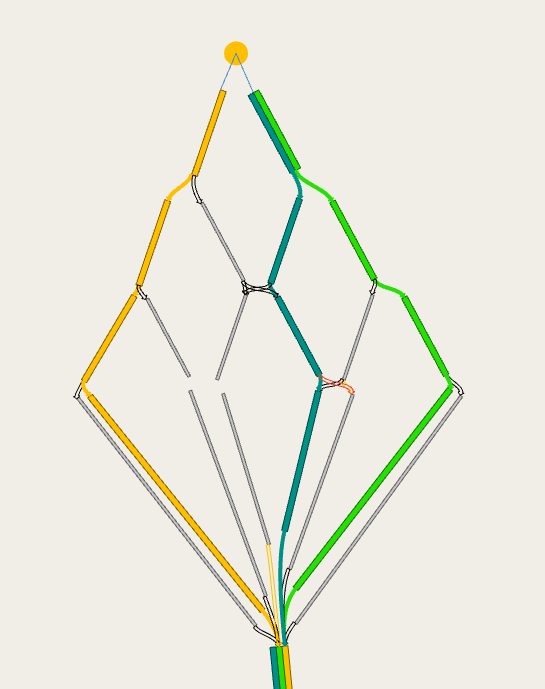 |
In the next cost interval, using the DCF and the costs at the end of the previous interval, calculate the least cost path tree.
Add only the least cost path to the set. There are now (up to) three paths in the path set. Calculate the probability of choice by applying the discrete choice function. |
|
In the next iteration, for each interval, calculate, using the DCF and the costs at the end of the same interval in the previous iteration, the least cost path tree.
Add only the least cost path to the set.There are now (up to) three paths in the path set. Split vehicles equally. |
| 4 | 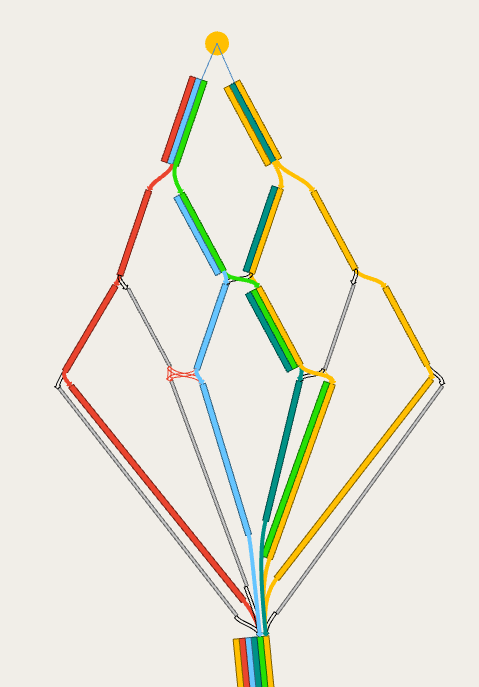 |
In the next cost interval, using the DCF and the costs at the end of the previous interval, calculate the least cost path tree. When there are multiple entrance connections, the tree will provide multiple paths for the same OD.
Add all these to the path set. With two entrance connections, it can contain up to eight paths. As the two new paths from the path tree already exist in the path set, only 6 paths are in the path set. Select from the path set the 3 paths with lower cost and calculate the probability of choice by applying the discrete choice function. |
|
In the next cost interval, using the DCF and the costs at the end of the previous interval, calculate the least cost path tree.
There are now (up to) four paths in the path set. Select from the path set the 3 paths with lower cost and calculate the probability of choice by applying the discrete choice function. |
|
In the next iteration, since we have reached the max number of paths, no new path trees are calculated.
The cost of the paths in the set is recalculated, using the DCF and the costs at the end of the same interval in the previous iteration. The vehicles are split according to the MSA, WMSA or gradient-based algorithm. |
Static Assignments
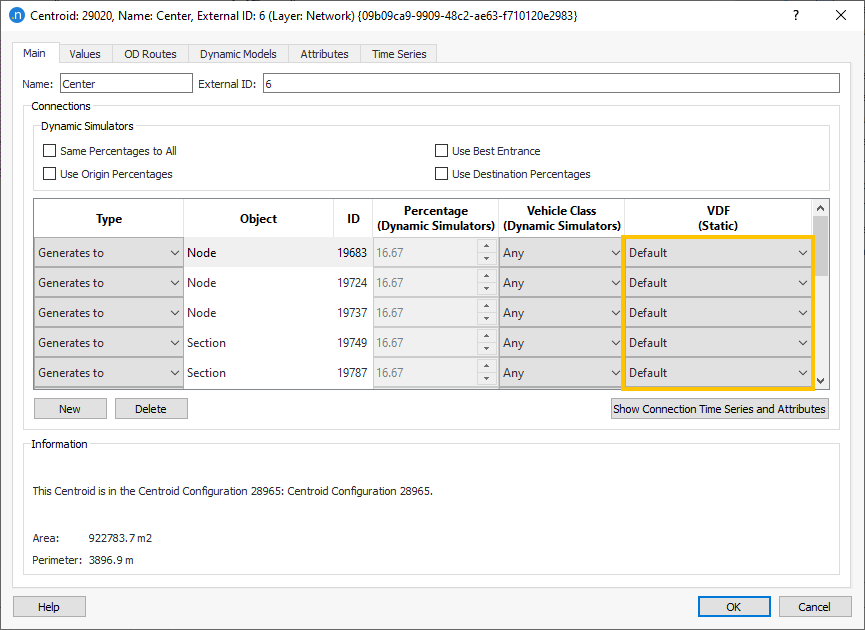
In static assignments the choice of the entrance and exit connections is solely controlled by the path calculation, which is influenced by the VDF set for the connection. If this is not defined, this will use the default VDF as the cost which is travel time in minutes. This uses the section speed of the entrance section and the distance of the connector to give a free flow travel time. If you are using a generalized cost in the rest of your model, then the VDF of the centroid connection will need to be altered so that it is consistent. This can be changed in the centroid menu.
Note that as a hybrid macro-meso is a dynamic assignment, the choice of the connections is controlled as described in the previous chapter.
What happens when you use the path assignment from a previous run?
This depends on the type of experiment that the path assignment file is from and the type of experiment it is being used for.
- Static assignment with static path assignment input: the percentage split between the paths and thus the connectors is given by the percentage assigned to each path in the path assignment file for the first iteration. Subsequent iterations will alter the percentages and the path set according to the static assignment algorithm.
- Static assignment with dynamic path assignment input: you cannot run a static assignment with a dynamic path assignment file.
- SRC dynamic assignment with static path assignment input: the vehicles that are using “path assignment” as their source of paths will follow the paths and probabilities of choice in the path file, which means that the percentages in the connections or use best entrance have no effect on them (they have only effect on vehicles following a path provided by the stochastic route choice). Note that if there was no trip between the OD pair in the run that generated the path file, the vehicle will use stochastic route choice.
- SRC dynamic assignment with dynamic path assignment input: the vehicles that are using “path assignment” as their source of paths will follow the paths and probabilities of choice in the path file, which means that they will be affected by the percentages in the connections or use best entrance set when the path file was generated (the ones currently set have only effect on vehicles following a path provided by the stochastic route choice). Note that if there was no trip between that OD pair in the run that generated the path file, the vehicle will use stochastic route choice (so be sure to set the same random seed).
- Dynamic user equilibrium with static or dynamic path assignment input: vehicles are first split according to the origin or/and destination percentages currently set (if any), then the initial path set and probabilities of choice are read from the path file (with some modifications in case of inconsistent settings: if it comes from a static assignment, or from a dynamic assignment with no connection percentages, and the connections currently have percentages, the probabilities of choice are rebalanced to 100% per connector; if it comes from a dynamic assignment with connection percentages, and the connections currently don’t have percentages, the first x paths for each OD are taken and their probabilities rebalanced to 100%).
Geometry configurations:
If a centroid is connected to one or more sections which are not present in the current active view, then the percentage split might not add up to 100% for each combination of Geometry Configurations. There are several options to cope with this situation:
- Allow Aimsun Next to set the percentage split for all sections by either setting the connectors to default, same percentages to all or use best entrance.
- If a centroid is connected to sections 1,2,3 in one configuration and 1,2,4 in another, ensure the splits for 3 and 4 are the same.
- Edit the connecting sections to ensure there is a single common section connecting to the centroid for all Geometry Configurations.
- Split the centroid into one centroid per connection using the split centroid tool and change the connections in the geometry configuration.
- Duplicate the centroid and edit the demand and the splits in different matrices for each copy of the centroid. Create new Traffic Demands to hold the edited matrices and select a Traffic Demand for the scenario that is consistent with the Geometry Configuration.

How to code roundabouts – Part 1
November 2019: Tessa Hayman explains different methods of coding roundabouts for different roundabout layouts, ensuring correct lane usage and lane-changing behavior from entry to exit.

How to set different speed limits for different vehicle types in Aimsun Next
October 2020: Tessa Hayman reveals how to set different speed limits for different vehicle types in dynamic models.
The post Connecting centroids to multiple sections appeared first on Aimsun.